Features
Everything your church needs, in one system
From the first song on Sunday morning to the notes a member reads on Wednesday night, Candlestick carries your church’s whole week. Here is what it does.
Sign up and use it as a member, free for 7 days. How the demo works.
Feature guide
What each feature does
The names you’ll see in the app, explained in a sentence or two. Tap one to read it.
The projector
One projector for everything on the big screen. The person running it puts up a Bible passage in one version or two, one above the other, a song with its key and its translation, or a Message quotation with the Message Library. There’s no switching between programs during the service. Pair the screen once and the Pulpit, the Bible and songs all go to it, run from a laptop, tablet or phone.
Songbook and song collections
Your church’s own songs, with their keys, in one or more languages. Worship leaders build a collection of the songs they’ll sing, in order, and the projector opens it and moves from one song to the next. Songs can be copied or moved between collections.
Asaph
Find songs for a theme. Describe it in your own words, or start from your iStudy notes, a service’s notes or a Pulpit deck, and AI suggests fitting songs from your own songbook, with the reason for each. It’s in Pulpit too.
Pulpit
Sermon slides in minutes. A preacher picks a Bible verse or a quotation, and Pulpit lays it out and sizes it so it stays readable from the back row. It has a presenter view for the preacher, and On the spot brings up a verse, a quotation or a blank slide that isn’t in the deck. It keeps any save that fails and tries again, so no slide is lost.
Pulpit Create with AI
A preacher shares the thought, the verses to emphasise, the kind of sermon and its length, and AI plans the sermon and builds the slides. Verses and songs come from your church’s own Bible and songbook, never made up.
iStudy
Sermon notes members take in the app during the service. Adding a Bible verse or a quotation takes a tap. It works with no network, and the notes sync later and are there on any device.
Live services
Your service streams into your app, with a countdown beforehand, a notification when you go live, and live chat: with Flame, your own stream that goes live by itself, or from your YouTube channel or Vimeo account.
The services library
Every service kept after it’s streamed, searchable by minister, date or title, with the Bible verses and notes from the day. Services can be grouped into series and collections.
The offline library
Members save sermons, music, the Bible, the songbook and more while they’re on Wi-Fi, and use them with no data at all. Your church decides what can be saved.
Shofar Audio
Your church’s own radio station, called Shofar Audio unless you give it a name of your own, playing the sermon recordings you keep with Candlestick around the clock, so everyone listening hears the same sermon at the same time. Run one channel or more.
Special songs and music videos
Your church’s own music in audio and video, kept with your storage. Members make playlists, mark favourites and save songs for offline listening.
Pastor’s Corner
A Bible verse, and a quotation if your admins like, chosen by your church and shown on the app’s home screen for everyone who opens it.
The Holy Bible and Audio Bible
The Bible in the languages your church chooses, readable offline, with the King James Version read aloud as an Audio Bible.
Groups
Groups such as the men, the youth or the ministers. A group can be given its own streams, services and tests that no one else sees.
Sunday School
Teachers set tests for each age group and send them to the right class. The children answer on a phone, the test marks itself, and the results are shared with them. Teachers see every result.
Treasures
Teachings to read and revisit. Your church prepares each one with headings, Bible verses, quotations and pictures, and publishes it when it’s ready. Readers choose their text size, jump to any part and pick up where they left off.
Give
How to give to your church: what members can give to, and your bank, mobile money or in-person details. Members see when the details last changed, and a notice that the church never changes them by message. No money passes through Candlestick.
Gallery
Picture albums from church life, each with its own captions and your choice of who sees it.
AI song translations
AI drafts a translation of a song, and an editor in your church reviews it before anyone sees it.
For Message assemblies
Optional. Churches that don’t switch them on never see them.
The Message Library and The Spoken Word
The Spoken Word to read, search and save offline, in English and the translations your assembly chooses, with Message books and quotations for the projector, Pulpit, service notes and iStudy. The sermons are never sold.
Berean Search
AI-powered search for the sermons. Ask a question in your own words and it finds the quotations that speak to it, or summarises a theme across many sermons. Every answer shows its quotations with references, so it can always be checked.
Message translations
A workflow to translate the Message books: AI first drafts, a shared glossary, review stages and a final check before publishing. Your assembly owns its translations and can share them with other assemblies.
Your own app
An app, without the app store
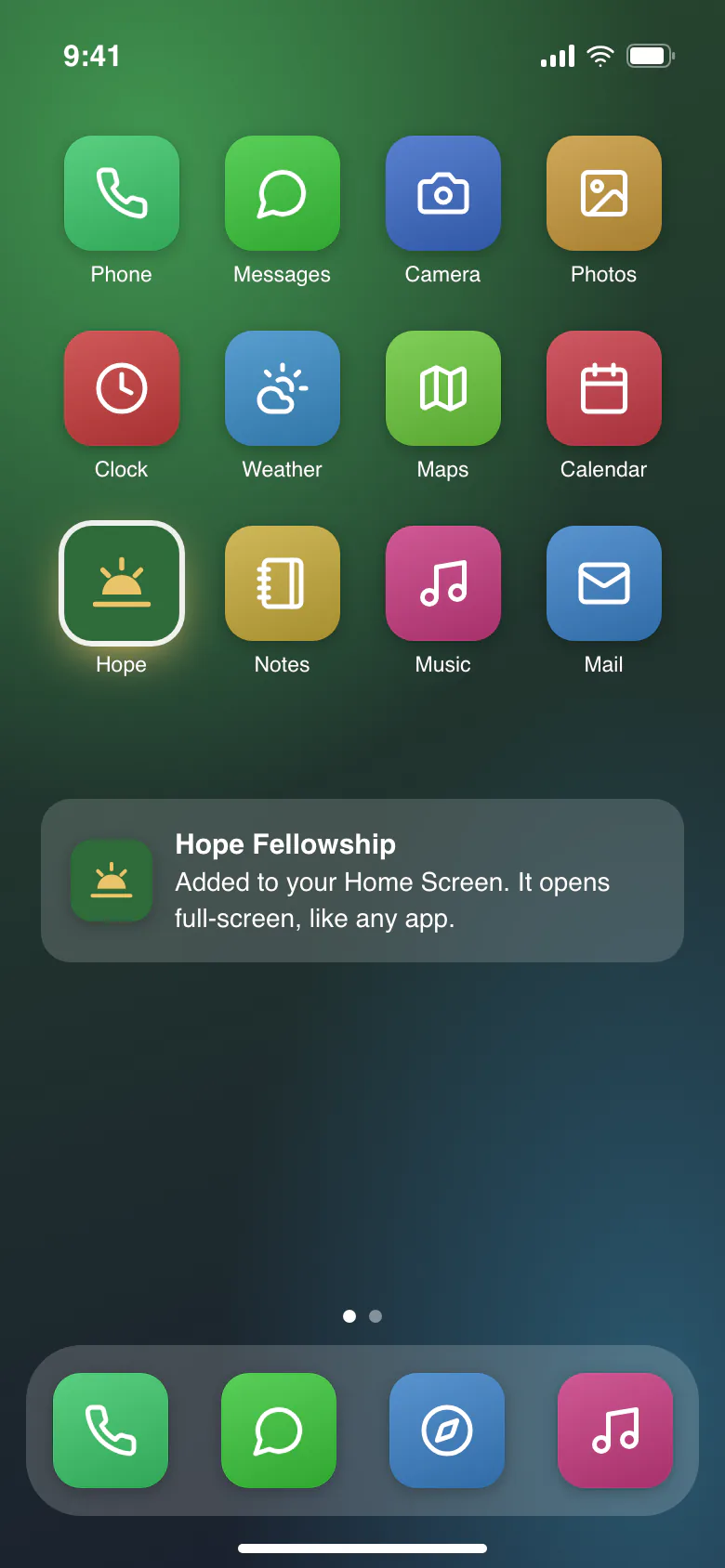
Your members open your church’s address once and tap “Add to Home Screen”. From then on it opens full-screen from its own icon, with your church’s name, logo and colours, just like any app. There’s nothing to download from a store, no account with Apple or Google, and it updates itself.
On iPhone: open the address in Safari, tap Share, then “Add to Home Screen”.
On Android: tap “Install app”, or “Add to Home screen” in the browser menu.
- Works on Android and iPhone, including older phones
- Your address, or your own domain on Standard and Complete
- Light and dark themes
Colours
Your church’s colours, and each member’s own
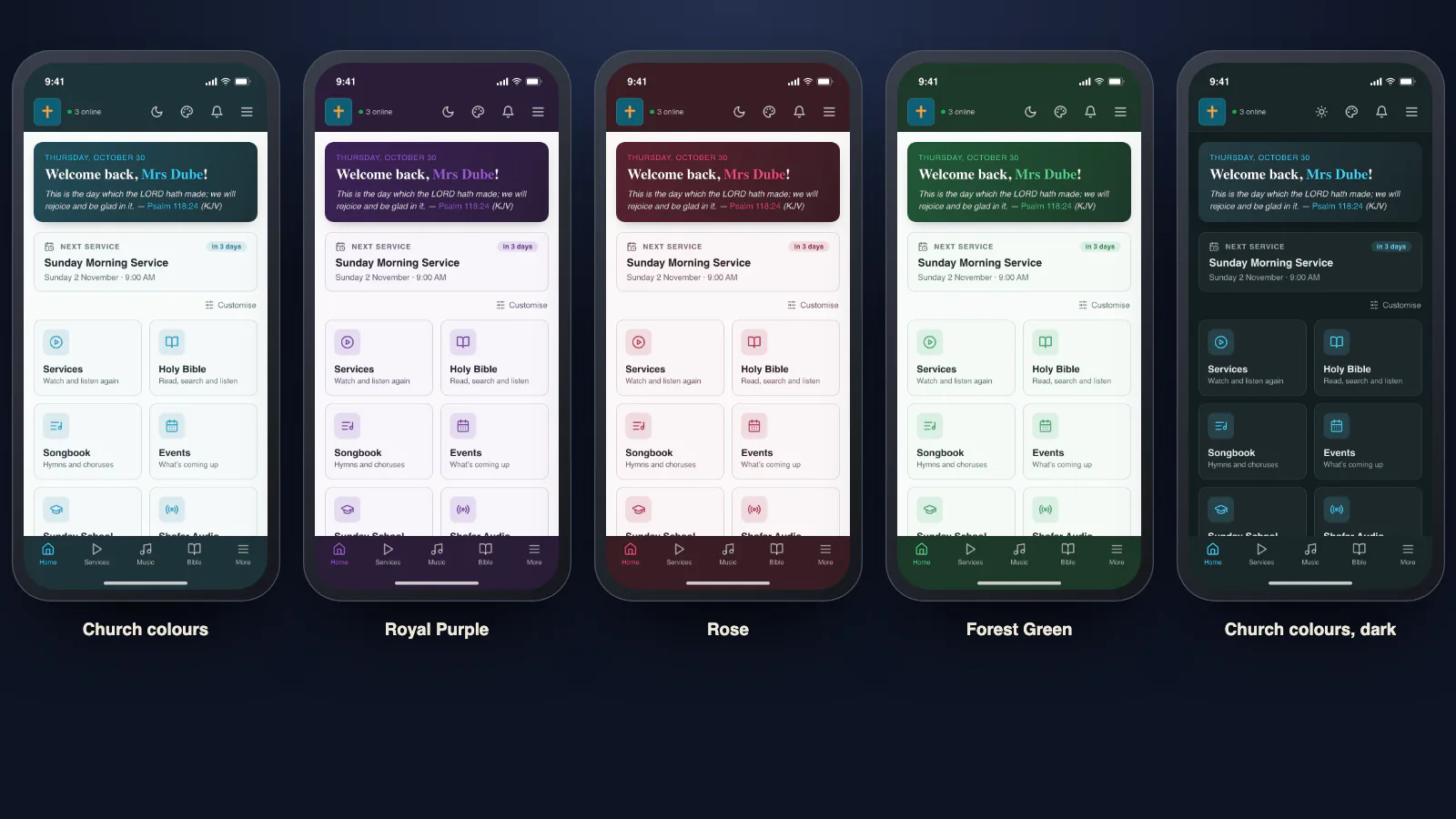
The app opens in your church’s colours. Members who prefer something else can pick a ready-made set, or make their own, and the app changes as they tap. It only changes their phone: everyone else still sees your church’s colours, and one tap brings them back.
- Ready-made sets: Wheat, Ocean Blue, Forest Green, Royal Purple, Rose and Slate
- Or any colour they like, kept easy to read
- Works in light and dark
- Saved to the member, so it follows them to a new phone

Offline
Works when the data runs out
Data is expensive, and the signal comes and goes. So members can save what matters onto their phone and use it with no connection at all:
- Sermon recordings and services
- Special songs and music videos
- The Holy Bible and the songbook
- The Spoken Word, for Message assemblies
- Pulpit slides, ready to present
Your church decides which content can be saved. Each download is checked once it’s saved, and saved files stay through app updates, even if an update goes wrong. Updates are light on data too: a change to one page downloads about 0.1 MB, not the whole app.

Sunday morning
One projector for songs and Scripture
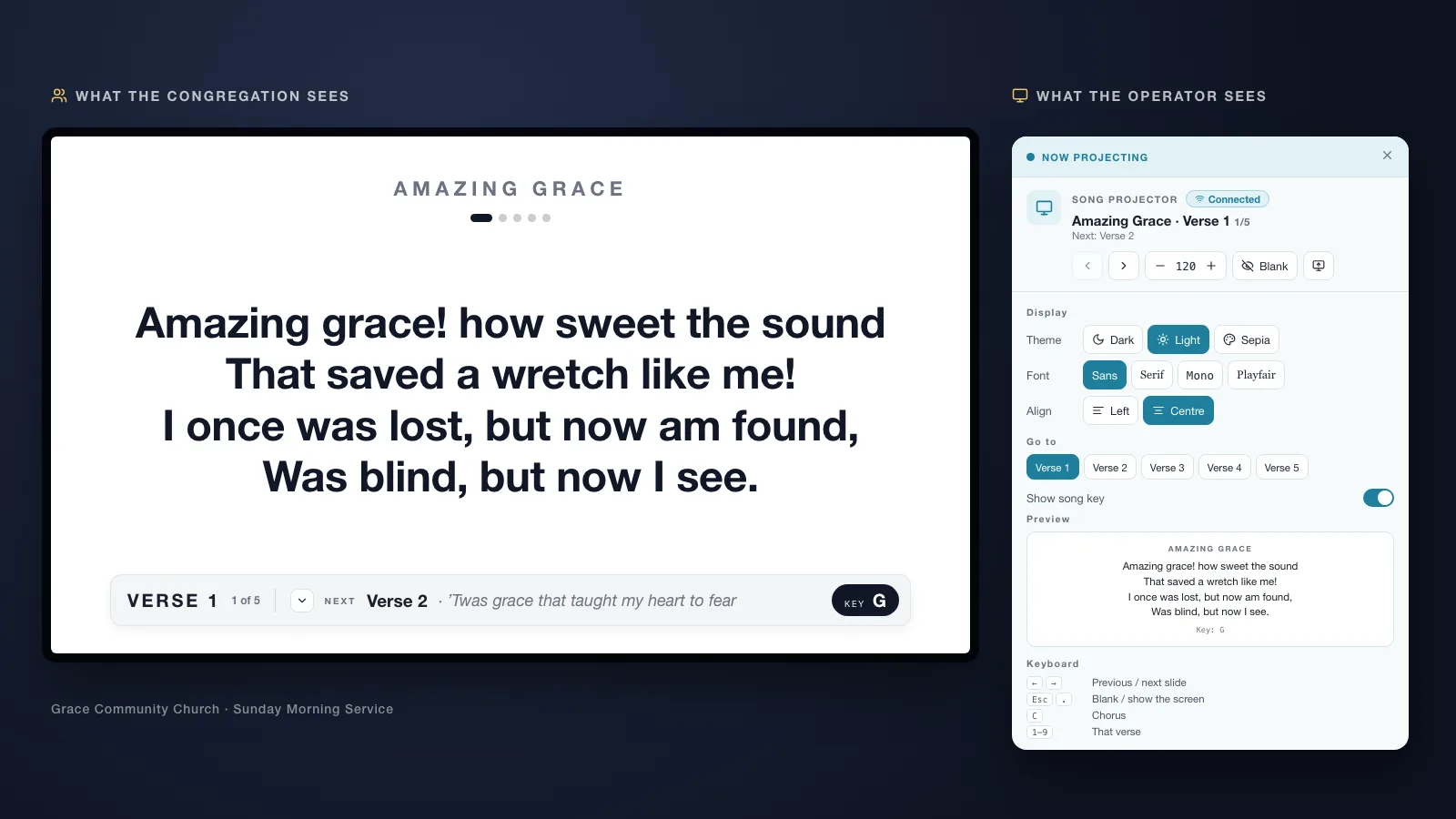
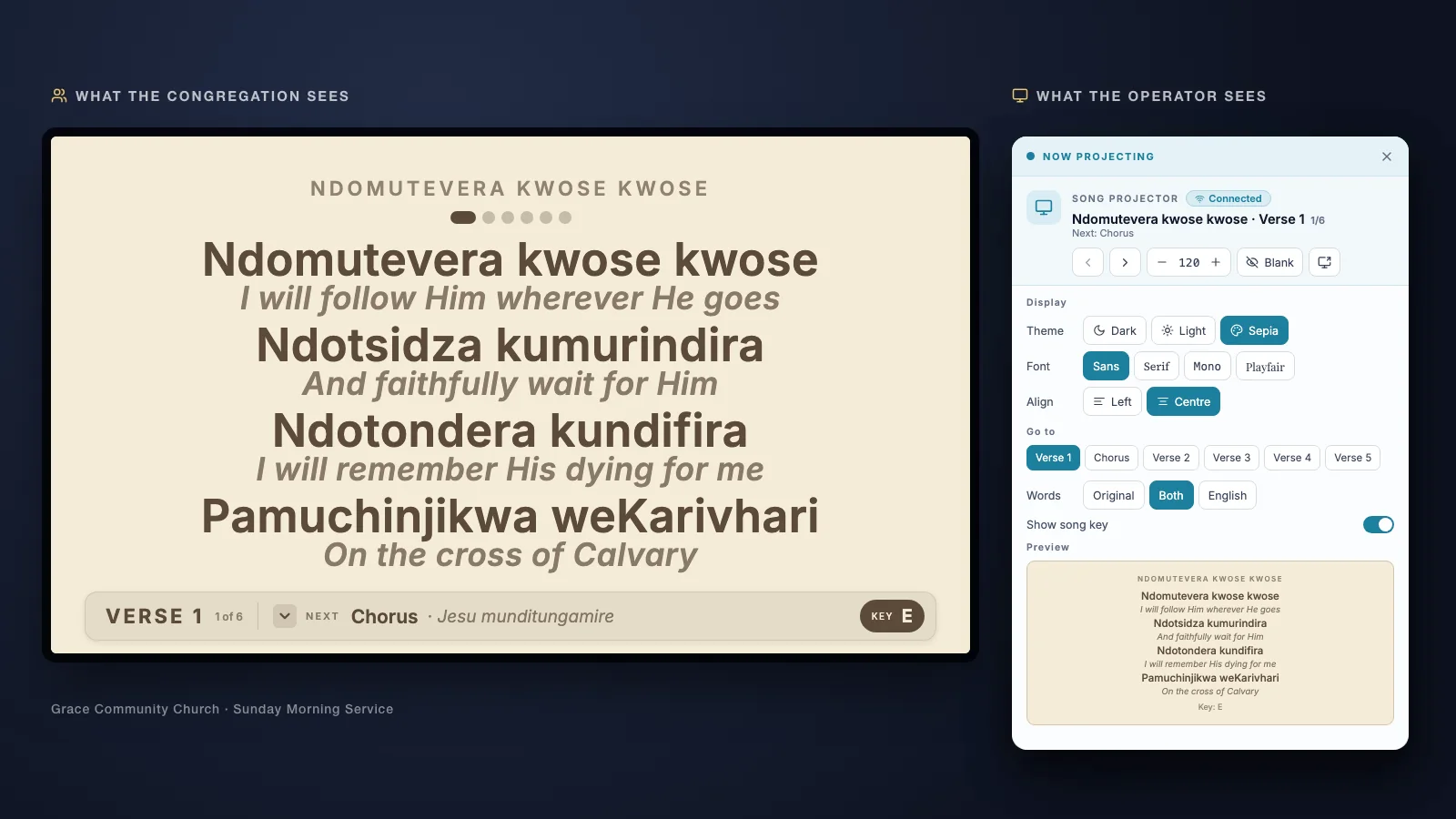
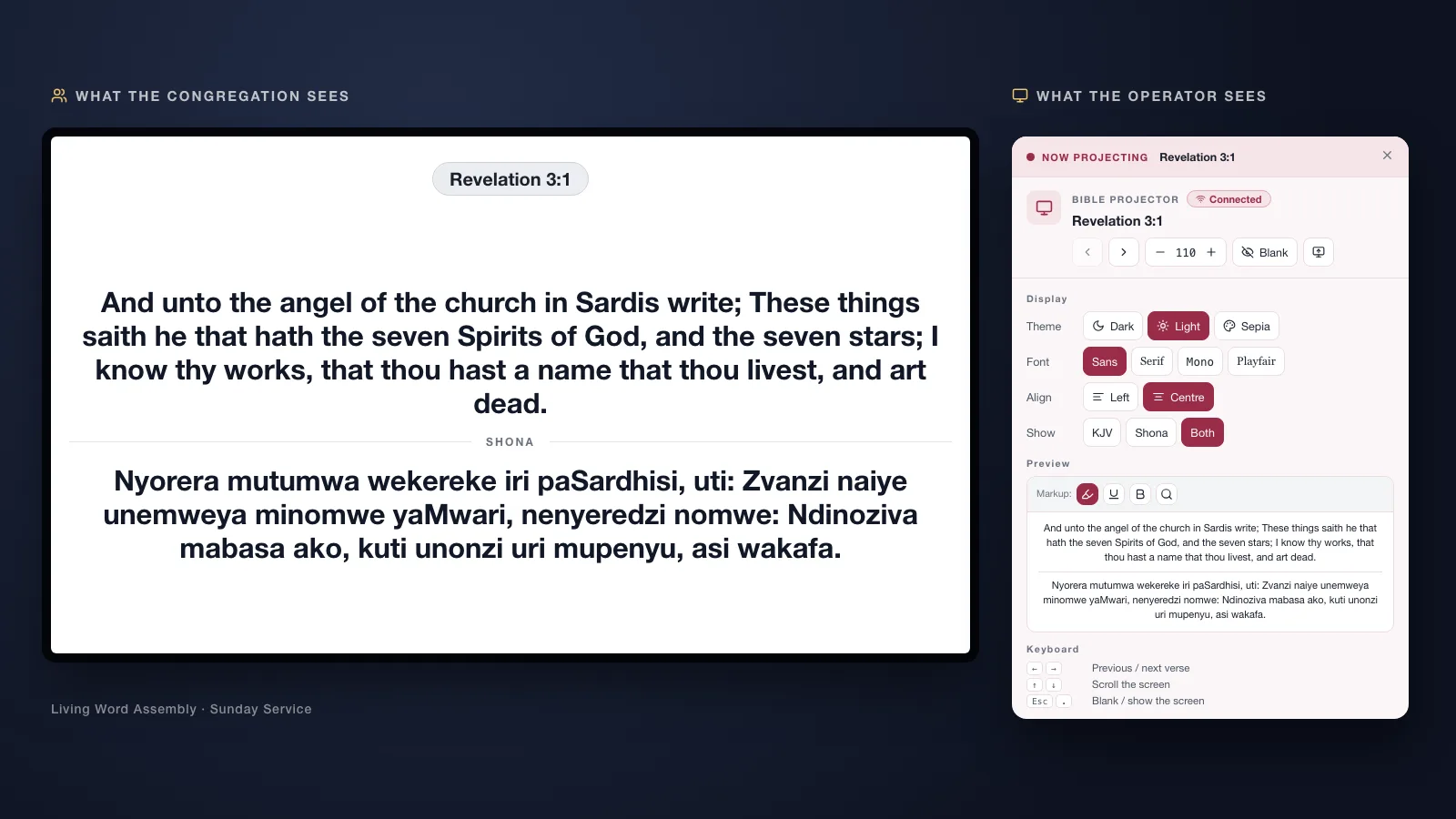
Less Sunday-morning pressure for your AV team: the person running the screen uses one simple projector for everything. Put up a Bible passage in one version, or two one above the other, such as English and Shona. Put up a song with its key, in its original language, in a translation, or in both with the translation under each line. The congregation reads; the operator stays calm.
- One Bible version, or two one above the other
- Songs in one language or two, with the translation under each line, and the key
- Message quotations too, in English or any supported language (with the Message Library)
Every package
Sunday morning
Pair the screen once. Project everything from anywhere.
The laptop on the projector opens one address with a short code. From then on, whatever the preacher or the operator puts up shows there: Pulpit slides, a Bible verse, a song, a quotation. Nobody re-pairs between programs, and nobody plugs in a different cable.
One code for everything
The same pairing serves the Pulpit, the Bible and the songbook. Moving from the slides to a verse puts the verse up; going back puts the slides back.
Drive it from any device
Run the screen from a laptop, a tablet in the pulpit or a phone. A clicker works too.
Ink that lands where you drew
Underline a word on a slide and it shows on the big screen in exactly the same place, even when you’re drawing on a tablet across the room.
No sign-in on the projector
The projector laptop doesn’t need the preacher’s account: the slides travel with the pairing, without the speaker notes.
Stop once
Stopping in any of them stops them all. Closing a page without stopping leaves the last picture up, not a blank or a waiting message.
Worship
The worship leader plans. The projector follows.
Song and worship leaders build a collection of the songs they’ll sing, in order. The person on the projector opens the collection and moves from one song to the next. No searching, no typing, no awkward pause between songs.
- Your church’s own songbook, with keys
- Each song in one or more languages, shown when you want them
- As many collections as you need: reorder them, and copy or move songs between them
- Members can keep their own song collections too
Every package

Every language
Your songs in the languages your members speak
Each song can carry its words in one or more languages. Members choose which languages they see, and the projector shows them when you want them, with the translation under each line. To get there faster, on Standard and Complete, AI drafts a translation of a song and an editor in your church reviews it before anyone sees it. It’s free.
Message assemblies on Complete go further: a full workflow to translate the Message books, with AI first drafts, review stages, a shared glossary so terms stay consistent, and a final check before anything is published.More about Message translations.
Preaching
Pulpit: sermon slides in minutes
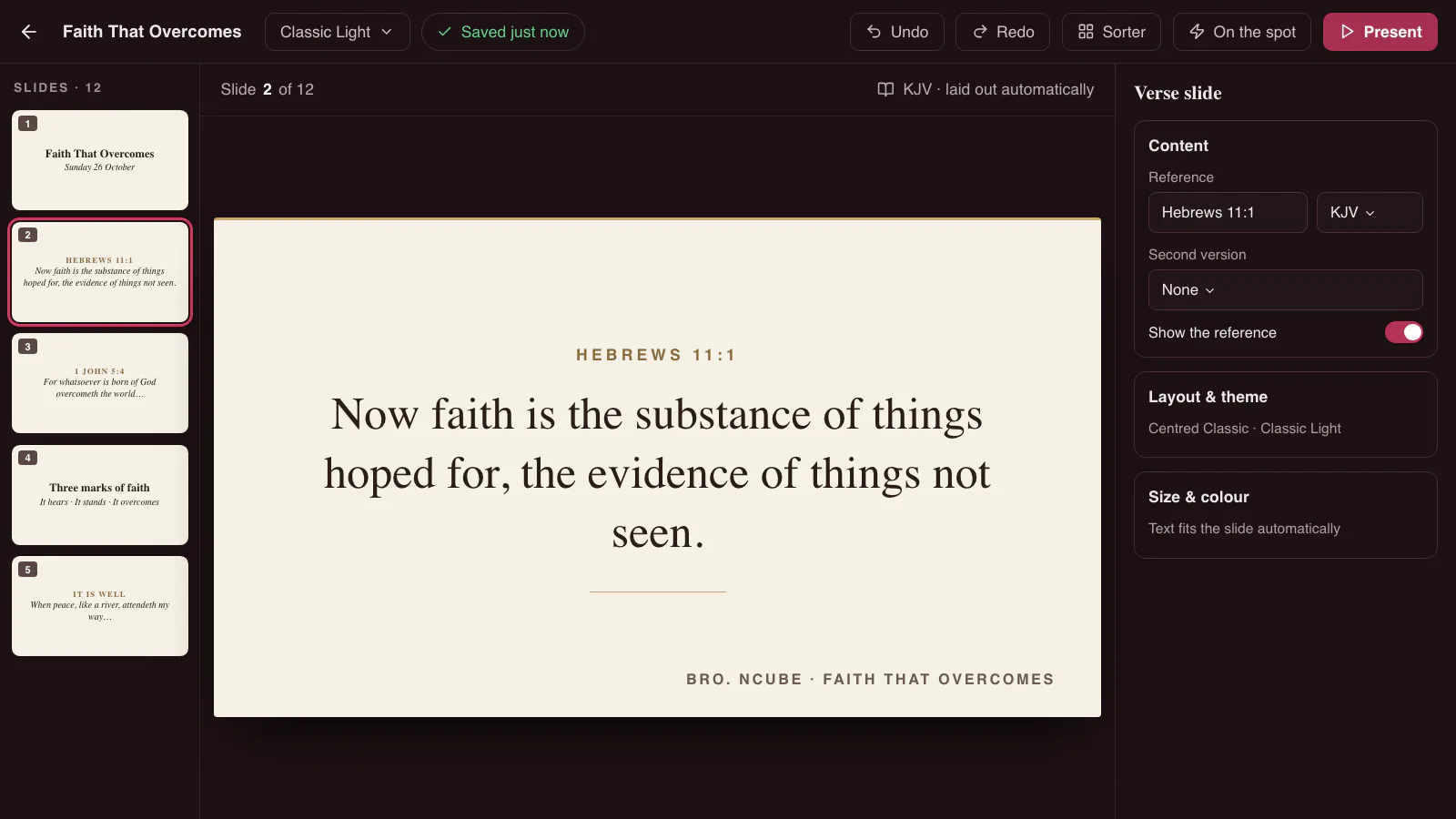
Pulpit is a presentation app made for preachers. Pick a Bible verse or a quotation, and Pulpit places it on the slide and sizes it so it stays readable from the back row. No fiddling with text boxes, fonts or layouts: the preparation time goes into the sermon, not the slides.
- Verses from any of your Bible versions, side by side if you like
- Quotations, song lyrics, pictures and tables
- A presenter view for the preacher: the current and next slide and your notes, while the congregation sees only the slide
- On the spot: show a verse, a quotation or a blank slide to draw on that isn’t in the deck, then carry on where you were
- Never loses a slide: a save that fails is kept and tried again, and the deck is copied before anything is removed
Pulpit is for your ministers: 20 ministers included; US$10 a month for each further 10.
Standard and Complete
Preaching
Plan the sermon with AI
Share your thought and the verses you want to emphasise, choose the kind of sermon (teaching, evangelistic or faith) and how long you’ll preach (30 minutes, 1 hour, 1½ hours or 2 hours), and ask for a closing hymn if you like. AI plans the sermon, you review the outline and drop anything you don’t want, and Pulpit builds the slides, ready to edit and present.
- Nothing made up: verses come word for word from your church’s Bible, and the hymn from your own songbook
- Message quotations too, with the Message Library
- Notes for each part of the sermon, in your presenter view
You choose which ministers get the AI. Up to 10 of the Pulpit ministers may use AI; US$10 a month for each further 10.
Complete
Teaching
Treasures: teachings to read and revisit
Some teaching is worth coming back to. Treasures gives it a lasting place in your app: your church prepares a teaching with headings, Bible verses, quotations and pictures, and your members read it at their own pace.
- Readers pick up where they left off, and see how far they’ve read
- Contents to jump to any part, and text at the size they like
- Work on a draft, preview it, and publish when it’s ready. Members keep reading the published version until then
- Your choice of who can read each teaching
Complete
Worship
Asaph: the right songs for the message
Named after King David’s chief musician. Describe a theme in your own words, or start from your iStudy notes, a service’s notes or a Pulpit deck, and AI suggests songs from your church’s songbook that fit, with the reason for each. It’s in Pulpit too, for choosing songs while you prepare.
- Only your own songbook’s songs, in the languages each member chooses
- Every search kept in the member’s history, to open again at no cost
- Your admins see which themes your songbook has no songs for, without seeing who searched
Complete
Services
Every service, live and kept
Stream your service straight into your app, and members get a notification when you go live. With Flame, it’s your own stream: no ads, every service also as audio, and on the day your team only presses Start and Stop, while Flame makes the service live and keeps the recording. Or keep using YouTube or Vimeo. Afterwards it joins your services library, where members can find any sermon by minister, date or title. The Bible verses and notes from each service are captured with it, so members can follow the preaching again. Candlestick doesn’t charge for streaming from YouTube or Vimeo (YouTube is free; Vimeo has its own paid plans). Without storage, the library is built from your YouTube or Vimeo videos. With storage, an add-on on Lite and Standard and included in Complete, the sermon audio and archived videos are kept with Candlestick too.
- Series that link services together
- The pastor’s own collections for the congregation, and members’ personal collections
- Stream to a group only, such as the men, the youth or the ministers, and no one else will know
- A player that reconnects by itself after a dropped signal, and lets latecomers watch from the start
Live: Every package Library: Every package

Shofar Audio
Your church on the air, day and night
Your church gets its own radio station, Shofar Audio or a name you choose, that plays the sermon recordings you keep with Candlestick, around the clock. Members tune in at any hour, on the bus, at work or at home, and everyone hears the same sermon at the same time. Run one channel, or more than one. Shofar Audio plays the recordings in your storage. It’s an add-on on Standard, and included in Complete.
Standard and Complete Add-on on Standard · included in Complete Add-on price: US$10 a month

Study
iStudy: notes that never get lost
Members take their sermon notes in the app during the service, even in a hall with no network. Adding a Bible verse or a quotation takes a tap, not a page of typing. When the phone is back online, the notes sync and are there on any device.
Standard and Complete

Music
Your church’s music, kept safe
With storage, your special songs in audio and video are kept securely and play straight from the app. Members pick a song in a tap, make playlists, mark favourites and save their favourites for offline listening.
Standard and Complete

The Word
The Holy Bible, read and heard
The Holy Bible in many languages, chosen by your church, with the King James Version read aloud by Alexander Scourby as an Audio Bible. And with Pastor’s Corner, your admins put a Bible verse, and a quotation if they like, on the app’s home screen for everyone who opens it.
Every package

Sunday School
Sunday School that marks itself
Teachers set tests for each age group and send them to the right class. The children answer on a phone, the test marks itself, and the results are shared with them. Teachers still write the lessons and the tests, and see every result: the app only takes away the repetitive marking.
Complete

Church life
A church family all week
Everything that keeps a congregation together between Sundays, in one place:
- Announcements for the whole church or part of it, sent now or at a time you choose
- Urgent notices with a dashboard banner, and a push members can’t switch off
- Events, and live notices during a service
- A countdown to the next live service
- Marriage banns, with photos
- A gallery of picture albums, with your choice of who sees each one
- Give: what members can give to and how, by bank transfer, mobile money or in person. No money passes through Candlestick
- Who’s online right now, so the church feels close even when it’s apart
- An About page for your story, your leaders and your locations
Every package

Running your church
Tools for the church office, not only a member app
Everything the people who look after your church need, without a separate system.
Roles and permissions
Admins get permission for their own area, such as services, music or members. Helpers can be given one task, such as Pulpit or the songbook, without the admin area.
Every change recorded
A record of every change: who made it, when, and what it was before and after, with a History button on each item.
Sign-up your way
Choose the questions new members answer, and whether someone approves them before they see members-only content.
Devices per member
Decide how many phones each member can be signed in on: one, two, three, or no limit.
Reports
See your reach, member activity and the content members engage with most, and who’s online right now.
Who sees what
Every item is public, for your congregation or for members only, and you set the default.
For End Time Message assemblies
The Spoken Word, quotations, radio and Berean Search
Switch on the Message Library and the sermons are in every member’s pocket, on the projector and in your Pulpit slides. It’s free, and the sermons are never sold.
Everything, package by package
Each feature can be switched off if you don’t need it. Compare the packages. Prices here are in US dollars; the pricing page shows them in your currency.
Sunday and services
Projector
Songs and the Bible on the big screen: one Bible version or two side by side, song translations and the key.
Every package
Flame live streaming
Your own live stream straight into your app, with no ads: your team presses Start and Stop, and Flame makes the service live, tells your members and keeps the recording, in HD, a phone size and sound only. Added to your package, in the size that fits how much you stream.
Every packageAdded to Lite or Standard, from US$25 a month · Complete includes Flame Sunday
Live services
Stream from YouTube or Vimeo into your app, with a notification when you go live, and live chat.
Every package
Services library
Every service kept, searchable by minister, date or title, with its verses and notes, grouped in series and collections.
Every package
Special songs and music videos
Your church’s music in audio and video, with playlists, favourites and offline saving.
Standard and Complete
Shofar Audio
Your church’s own radio station playing your sermons around the clock, on one or more channels.
Standard and CompleteAdd-on on Standard · included in Complete, US$10 a month
Pulpit
Sermon slides in minutes, a presenter view for the preacher, and On the spot for a verse or quotation that isn’t in the slides.
Standard and Complete
Pulpit Create with AI
Share your thought, your verses, the kind of sermon and its length, and get a planned sermon with its slides, and a closing hymn if you like.
Complete
The Word
Pastor’s Corner
Your admins choose a Bible verse, and a quotation if they like, shown on the app’s home screen.
Every package
Holy Bible and Audio Bible
The Bible in many languages, and the King James Bible read aloud.
Every package
iStudy
Sermon notes taken during the service, with verses and quotations added in a tap. Works without a network and syncs later.
Standard and Complete
Songbook
A ready-made songbook of public-domain hymns in each of your church’s languages, which you can use as it is, add your own songs to, or switch off. Songs have their keys, and song collections you can reorder, move songs between and share with other members.
Every package
Asaph
Find songs for any theme: describe it, or start from your notes or sermon slides, and AI suggests songs from your songbook.
Complete
Your members
Members
Sign-up with approval if you want it, profiles, roles, messages to members, and who’s online right now.
Every package
Home page and dashboard
A welcoming home page for visitors, and a dashboard that greets each member.
Every package
Announcements, events and schedule
Notices for the whole church or part of it, events, a service calendar and a countdown to the next live service. Members get a push when a service moves, is cancelled or is back on. An urgent notice also shows a banner and sends a push members can’t switch off.
Every package
Give
What members can give to and how: bank transfer, mobile money or in person, with its own ways to give for each fund, a featured verse and your own banner. Your church shares its own details, for members only by default, and recent changes to them are flagged. No money passes through Candlestick.
Every package
Groups
Groups such as men, youth or ministers, who can be given streams, services and tests no one else sees.
Standard and Complete
Your church’s story
About
Your history in words, pictures and video, your leaders and your locations.
Every package
Marriage banns
Published banns, with photos of the couple.
Every package
Gallery
Picture albums from church life, with captions, and your choice of who sees each album.
Every package
FAQ
Answers to your members’ common questions.
Every package
News (optional)
Simple posts about church life.
Every package
Social media links (optional)
Links to your church’s channels.
Every package
On any phone
Your church’s own app
Your name, logo, colours and address. Installs on any phone straight from the browser: no app store, no updates to chase.
Every package
Offline library
Save sermons, music, the Bible, the songbook and more, and use them with no data at all.
Every package
Teaching
Sunday School
Tests for each age group, marked automatically, with results shared with the children.
Complete
Treasures
Teachings to read and revisit: your church prepares them with verses, quotations and pictures, and readers pick up where they left off.
Complete